








Part 2 – Algorithms, Model Logic & Interpretation, and Real‑World Use Cases
🔗 Read the Full Series
- Part 1 – Configuration and Model Setup
- Part 2 – Algorithms and Use Cases
- Part 3 – Roadmap and Best Practices
Introduction
In Part 1, you learned how to build the scaffolding of an Advanced Prediction model. Now, we dive deeper, exploring the algorithm engine, interpretation techniques, and how to adapt the model for real-world business use.
This part is data science adjacent territory, and I’ll explain what’s happening under the hood and how to use outputs in your planning process.
1. The Algorithm Landscape & AutoMLx
Advanced Predictions support a range of ML and statistical algorithms, from simple exponential smoothing to ensemble ML models.
Oracle’s Advanced Predictions supports and leverages a robust portfolio of modeling techniques. You can choose a subset manually or let AutoMLx run them all and pick the best.
Supported Algorithms
Oracle AutoMLx
- NaiveForecaster – Naive and Seasonal Naive method
- ThetaForecaster – Equivalent to Simple Exponential Smoothing (SES) with drift
- ExpSmoothForecaster – Holt-Winters’ damped method
- STLwESForecaster – Seasonal Trend LOESS (locally weighted smoothing) with Exponential Smoothing substructure
- STLwARIMAForecaster – Seasonal Trend LOESS (locally weighted smoothing) with ARIMA substructure
- SARIMAXForecaster – Seasonal Autoregressive Integrated Moving Average
- ETSForecaster – Error, Trend, Seasonality (ETS) state space Exponential Smoothing
- Prophet Forecaster – Facebook Prophet, only available when explicitly provided to the AutoML Pipeline through the model list parameter.
- ExtraTreesForecaster – A reduction-based machine learning model based on ExtraTrees regression model
- LGBMForecaster – A reduction-based machine learning model based on LGBM regression model
- XGBForecaster – A reduction-based machine learning model based on XGB regression model
2. Under the Hood: Model Fitting, Validation & Overfitting Guardrails
When AutoMLx trains models, here’s roughly what happens:
- Train/Validation Split: The historical window is segmented (e.g., 80/20 split or rolling folds)
- Feature Transformations: Some models require stationarity or detrending; others implicitly manage that
- Hyperparameter Search: For ML models (e.g. XGBoost, LightGBM), a grid or random search is done (within bounds)
- Residual Analysis: After training, residuals (actual – fitted) are analyzed for bias, heteroscedasticity, autocorrelation
- Model Selection: The algorithm with minimal error and acceptable residual behavior is chosen
- Confidence Interval Estimation: Many models (especially statistical ones) naturally generate error bounds; for tree-based models, quantile regression or bootstrapping may be used
This “trial by algorithm” approach spares you from manual hyperparameter tuning while still giving flexibility to override when needed.
Oracle’s internal pipeline wraps and abstracts this, so you don’t need to code it yourself, but the logic matters when interpreting output.
3. Interpretation – Turning Output into Business Insight
The raw numbers are useful, but the real value is in interpreting and explaining to stakeholders.
Fitted vs Actuals
Plot historical actuals along with the fitted values line. Where they diverge, you can see which periods your model “missed” (e.g. shocks, structural breaks).
Residual Analysis & Diagnostics
Check residual plots (error over time) for patterns (bias, autocorrelation). If residuals are not white noise, it suggests model misspecification.
Feature Importance / Driver Contribution
While explainability is on the roadmap, you can already see which drivers contributed most (in ML models). This is critical to trust: e.g., “Promotions explain 30% of variance, GDP 15%, base trend 55%.”
Event Impact Overlay
When you enable events (recurring / one-off), the model can overlay the event’s effect. You can visually see how events pushed deviation vs baseline.
Confidence Bands
Use P10–P90 bands to guide risk assessment. For example:
- If a forecast’s lower bound is still above the desired threshold, the target is safe.
- If the band is wide in volatile periods, you may want conservative planning.
Version Comparison
Because Oracle allows you to save results per algorithm version, you can run multiple configurations (e.g. AutoMLx vs XGBoost) and allow planners to switch on forms to see alternative predictions side-by-side.
4. Expanded Use Cases
Use Case A: Product Revenue Forecasting
Target: Monthly revenue
Drivers:
– Promotions (dollar spend)
– Average selling price
– Industry index (macro)
– Holiday season dummy
Approach:
– Run baseline with 2 drivers (promo, price)
– Expand to 4–5 drivers
– Compare error vs univariate model
Insight: Model may show that promotions drive 25–30% of variance; price elasticity is captured more dynamically.
Use Case B: Workforce Planning & Attrition
Target: Headcount / attrition
Drivers:
– Average tenure
– Age distribution
– Satisfaction scores
– External unemployment rate
Value: You can simulate a shift in satisfaction and estimate downstream attrition, enabling proactive recruiting or retention policies.
Use Case C: Service / Product Hybrid Model
Target: Call volume, service headcount, cost
Drivers:
– Number of product units in field
– IoT usage metrics (hours in service)
– Incident rates
– Maintenance schedules
Value: As you shift from sale to “service as a product,” you can forecast the resource plug-in impact.
Use Case D: Event-Sensitive Sales Forecast
Events: Product launches, promotions, supply chain disruptions, holidays
Approach: Label events as recurring fixed (e.g. Christmas), recurring movable (e.g. Ramadan), one-off (e.g. plant outage), or skip (pandemic).
Benefit: Enables pre- and post-event planning sensitivity analyses, i.e. “if Olympic demand surges, how does the forecast shift?”
5. Challenges, Limitations & Workarounds
- Limited explainability today (feature importance is roadmap)
- Overfitting risk with many drivers and small historical window
- Missing/faulty driver data can degrade models
- Event representation complexity: misclassifying events can mislead forecasts
- Processing latency for large models
- Parent-level prediction limitations (until dynamic calc roadmap)
Also, when running the model, sometimes it gets stuck on the OCI data science job.
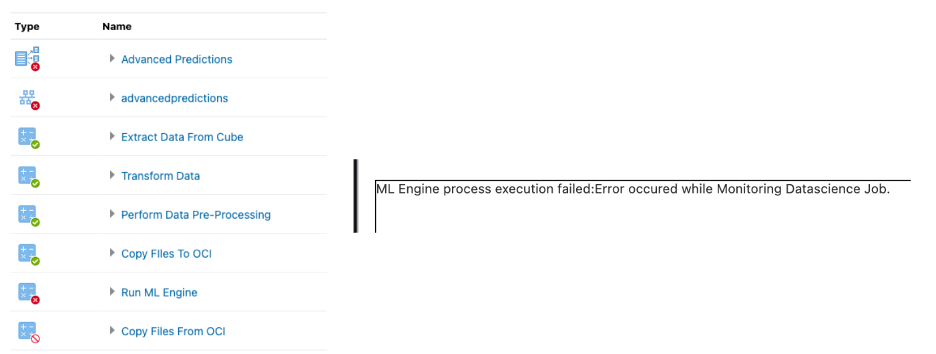
Workarounds:
- Regularly backtest and monitor performance
- Keep driver counts modest initially
- Use domain logic to vet feature importance
- Use rolling-origin splits in backtesting
- Use simple models in volatile domains
Conclusion & What’s Next
By now, you should understand not only what the engine runs but why and how to interpret its outputs meaningfully for planning.
In Part 3, we’ll focus on long-term strategy: feature engineering roadmap, dynamic parent-level prediction, deployment best practices, and how to embed Advanced Prediction into your FP&A operations.