








Introduction
Oracle EPM Cloud gives practitioners a choice that is easy to overlook: standard Planning applications, with their familiar required dimensions and prebuilt module logic, or FreeForm, a fundamentally different application type that removes those dimensional constraints entirely. When FreeForm was first introduced, it was often described simply as ‘Essbase in the cloud with a Planning UI.’ That description is not wrong, but it undersells the architectural significance of the decision.
After working with FreeForm across a number of implementations, the question I get asked most consistently is: when should I actually use it? The answer is not obvious, and getting it wrong early in a project is costly. This post is a practitioner-level guide — covering the architectural differences, the decision criteria, specific use cases where FreeForm wins, and a step-by-step walkthrough of building a FreeForm application the right way.
4 years ago, I published my first post on FreeForm when the feature was still in its early stages. Since then, the functionality has evolved significantly. A lot has changed and this post reflects where FreeForm stands today. You can find the original post here for reference.
Planning Lab – FreeForm Planning
1. What Is FreeForm?
FreeForm is an application type within Oracle EPM Enterprise Cloud Service. Unlike standard Planning, which imposes six required dimensions (Account, Entity, Scenario, Version, Period, Year) and builds financial intelligence around them, FreeForm imposes no mandatory dimensional structure. You define the cubes, the dimensions, and how they relate.
Key boundaries to know from the start:
- Up to 12 cubes per application
- Up to 26 custom dimensions (up to 29 when using native Account, Entity, and Period dimension types)
- Cubes can share dimensions or have fully standalone dimensionality
- Members must be unique across all cubes within the same FreeForm application
- Each BSO cube is automatically created as Hybrid BSO
- Requires EPM Enterprise Cloud Service — not available in Standard Edition
FreeForm supports the full EPM Cloud feature stack that practitioners rely on: Groovy business rules, Calculation Manager, Smart View for Office, Data Integration, Data Maps, Smart Push, web forms, dashboards, and reports. What it does not have — at least as of the current release — is sandboxes, approvals, and Task Manager.
| 📌 Key Point
FreeForm is not a reporting-only tool and it is not a lightweight Essbase replacement. It is a full planning and analysis platform, without the Planning dimension. |
2. FreeForm vs. Standard Planning: The Architectural Difference
The most important distinction between FreeForm and standard Planning is not the feature list, it is the dimensional contract. In a standard Planning application, the six required dimensions carry embedded business logic: Account drives financial intelligence (variance sign, time balance behavior, exchange rate type), Entity carries security and ownership, Scenario and Version control the planning cycle. None of this exists automatically in FreeForm.
In FreeForm, everything is custom. That is both its power and its responsibility. The table below summarizes the key architectural differences.
| Aspect | Standard Planning | FreeForm |
| Required dimensions | 6 (Account, Entity, Scenario, Version, Period, Year) | None — all dimensions are custom |
| Financial intelligence | Built into Account dimension (variance, time balance, exchange rate) | Must be modeled manually via member properties and calc logic |
| Prebuilt modules | Financials, Workforce, Capital, Projects | Not available — build everything from scratch |
| Cube type | Hybrid BSO + optional ASO reporting cube | BSO, ASO, or Hybrid BSO — your choice per cube |
| Maximum dimensions | Up to ~30 across cubes depending on module | 26 custom (up to 29 with native dim types) |
| Maximum cubes | 1 BSO + 1 ASO typical | Up to 12 cubes |
| Data Maps / Smart Push | Supported | Supported |
| Groovy rules | Supported | Supported |
| Approvals | Supported | Not currently available |
| Sandboxes | Supported | Not currently available |
| Source for migration | Cannot import Essbase OTL directly | Can import from Essbase OTL file (first cube only) |
The absence of built-in financial intelligence is the single biggest design consideration. When you create an Account dimension in standard Planning, variance sign, time balance behavior, and exchange rate type are all managed through the Account dimension’s native properties. In FreeForm, if you want those behaviors, you have to explicitly model them through member properties and calculation logic. That is not necessarily harder, but it does require deliberate design.
3. When to Use FreeForm Over Standard Planning
FreeForm is not the right choice for every project, and choosing it when standard Planning would serve better adds unnecessary build complexity. The decision criteria below reflect real implementation patterns.
3.1 Migrating On-Premises Essbase Cubes to Cloud
This is the most straightforward FreeForm use case. If your organization runs standalone Essbase cubes on-premises — whether as analytical repositories, custom reporting cubes, or operational models — and you want to migrate them to Oracle EPM Cloud without rebuilding from scratch, FreeForm is the right landing zone.
FreeForm supports import from an Essbase OTL file (version 11.1.2.3 or later) for the first cube in the application. This preserves your dimension structure, member hierarchy, member formulas, and storage properties. Subsequent cubes must be built through the application wizard or Smart View Excel templates, but the first cube can come directly from an existing outline.
| ✅ Use FreeForm When
You are migrating Hyperion Essbase cubes that do not conform to the six required Planning dimensions. Your existing outline has custom dimensionality that would require significant re-architecture in standard Planning. You want to preserve existing calc scripts and member formulas with minimal rework. |
3.2 Custom Operational Planning Models
Standard Planning modules (Financials, Workforce, Capital) are purpose-built for financial planning cycles. When your use case is operational rather than financial — supply chain planning, project resource modeling, manufacturing throughput planning, sales volume analysis — the prebuilt module structure can become a constraint rather than an accelerator.
FreeForm lets you define dimensions that match the operational data model exactly. A supply chain application might have dimensions for Product, Location, Channel, and Transportation Mode — none of which map cleanly to the Account/Entity structure. A capacity planning application might need Equipment Type, Shift, and Production Line as its primary sparse dimensions.
| ✅ Use FreeForm When
The primary planning dimensions are operational, not financial. The Account and Entity dimensions of standard Planning would require awkward workarounds to model your data. You need more than 2-3 sparse dimensions that carry business meaning in their own right. |
3.3 Multi-Source Reporting Repositories
FreeForm supports up to 12 cubes in a single application, with cubes that can have completely different dimensionality. This makes it a natural fit for building a centralized reporting repository that consolidates data from heterogeneous sources: one cube for financial actuals from an ERP system, another for HR headcount data, another for sales pipeline data, and a combined ASO reporting cube that aggregates them all for management reporting.
Because FreeForm cubes can push data between each other using Data Maps and Smart Push, you can model the full data flow within a single application — loading source data into individual BSO cubes and consolidating into a reporting ASO cube for distribution to Smart View.
| ✅ Use FreeForm When
You need to combine data from multiple systems with different dimensional structures into a single reporting layer. You want more than one BSO cube plus a reporting ASO cube within a single application. Your multi-cube design would otherwise require multiple separate Planning applications and cross-environment data movement. |
3.4 Large-Scale Ad-Hoc Modeling
Financial modeling exercises — M&A scenario analysis, long-range planning models, strategic what-if analysis — often require dimensional structures and calculation patterns that do not conform to a standard Planning template. FreeForm’s unconstrained dimensionality and full Groovy support make it a strong platform for these use cases, especially when the model needs to be built quickly and iterated frequently.
3.5 When NOT to Use FreeForm
FreeForm is not the right choice in several scenarios worth naming explicitly:
- Your use case is well-served by a prebuilt Planning module (Financials, Workforce, Capital). The module’s built-in forms, rules, and business process structure will save significant build time compared to starting from scratch in FreeForm.
- You need Approvals or Sandboxes in the near term. These features are not yet available in FreeForm.
- Your team is unfamiliar with Essbase cube design. FreeForm removes the guardrails of standard Planning, which means dimension design mistakes and block design errors have full impact. Without Essbase expertise, this can result in poorly performing applications.
- You are building a straightforward financial budgeting and forecasting application. Standard Planning with Custom application type or the Financials module will be faster to implement and easier to maintain.
4. How to Build a FreeForm Application: Step by Step
The walkthrough below covers the complete build process for a FreeForm application — from initial setup through cube design, dimension configuration, Smart Push, and Data Integration connection. The example scenario is a multi-source operational and financial reporting application with a BSO planning cube and an ASO reporting cube.
4.1 Application Creation
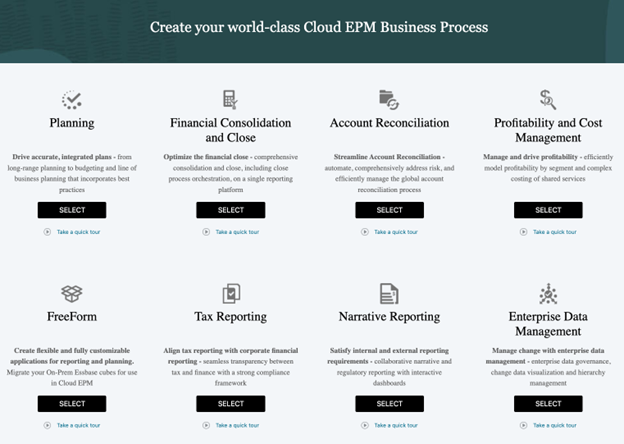
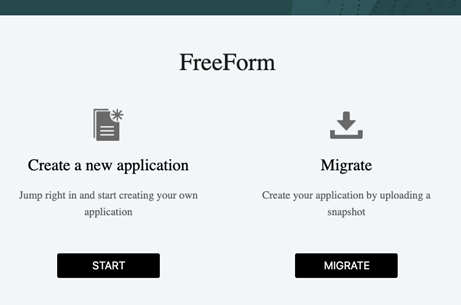
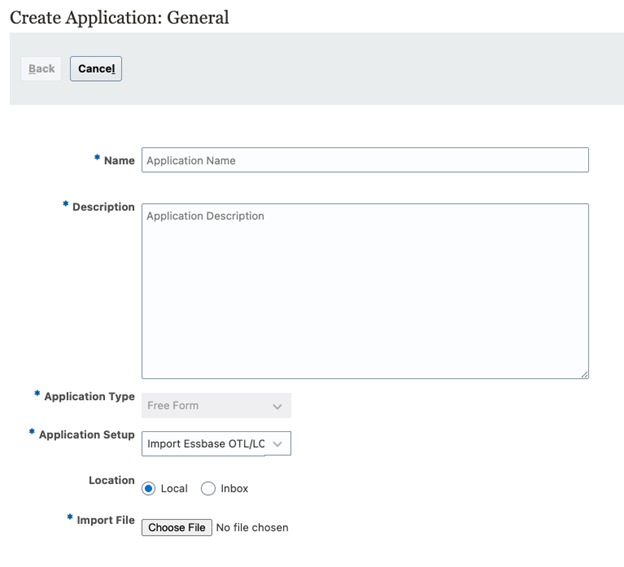
FreeForm applications are created from the EPM Cloud home page.
| Creation Method | When to Use | Notes |
| Application Wizard (manual) | New applications built from scratch | Full control over dimensions; most common for new projects |
| Import Essbase OTL File | Migrating existing on-prem Essbase cubes | OTL file name becomes the cube name — must be 8 characters or less |
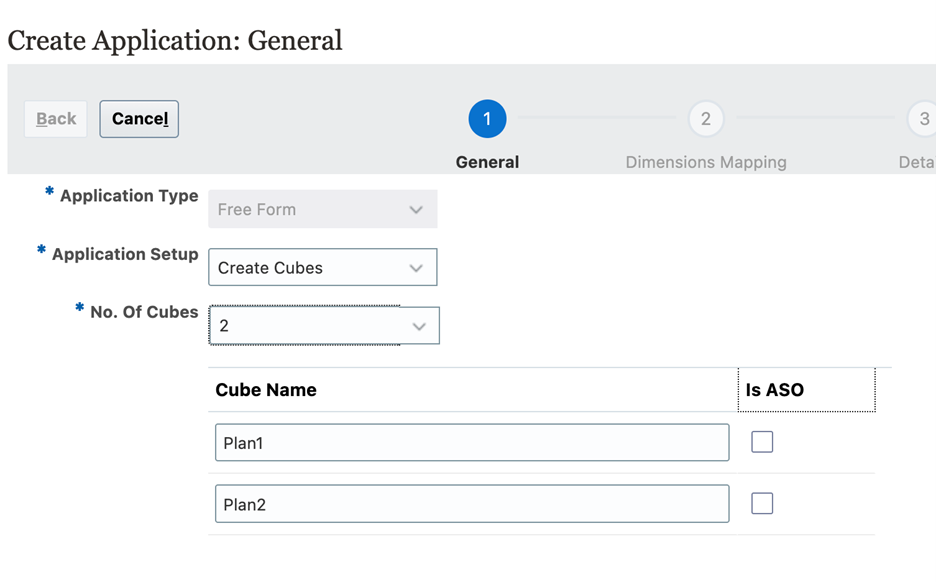
Up to 12 cubes can be added through the Cube Designer interface. Only the first cube can be created from an OTL import.
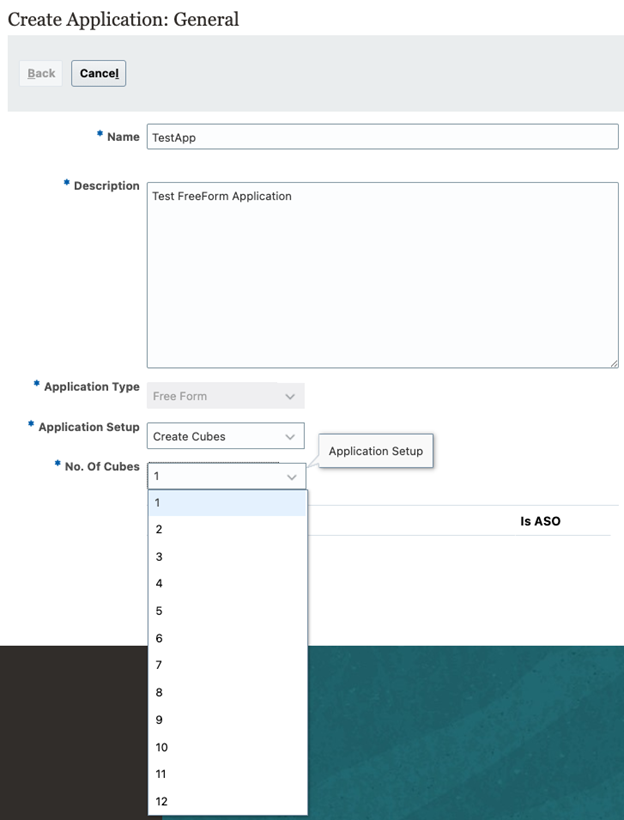
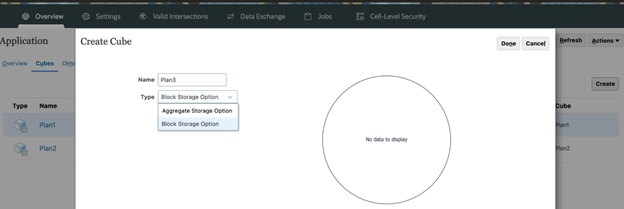
You can select BSO or ASO.
4.2 Dimension Setup in FreeForm
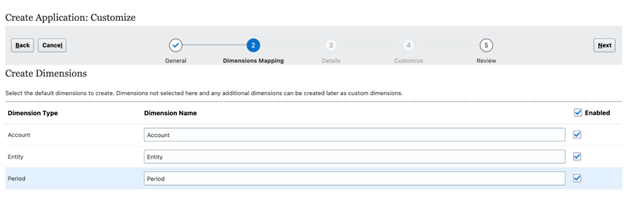
FreeForm dimension setup works similarly to standard Planning but with no required dimension types. You have three dimension type options for each dimension:
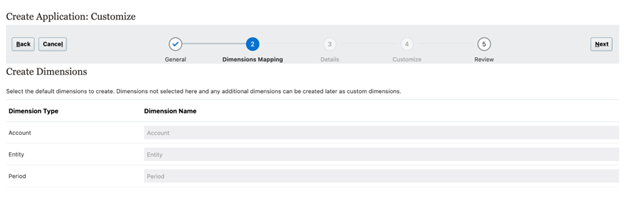
| Dimension Type | Description | Use Case |
| Custom | Fully user-defined; no built-in behavior | Most dimensions in operational models |
| Account (native) | Inherits financial account intelligence: time balance, variance reporting, exchange rate type | Use when your measures need financial behavior (P&L, Balance Sheet) |
| Entity (native) | Inherits entity/ownership behavior and security | Use when security by organizational unit is required |
| Period (native) | Inherits time period intelligence: spread, time balance | Use when you need built-in time spreading behavior |
A practical decision rule: if you do not need the built-in financial intelligence of a native dimension type, use Custom. Custom dimensions are simpler and give you full control. Only assign native dimension types when you specifically need the inherited behavior.
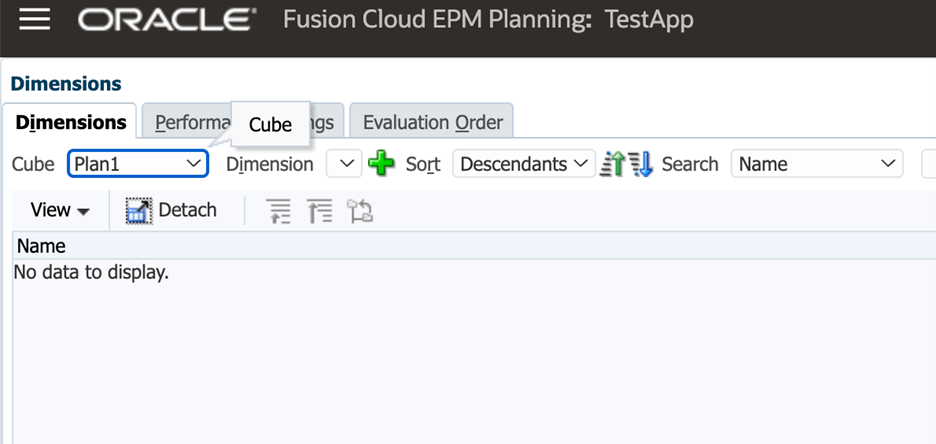
If you don’t use any native dimensions, after creating the application, the created cube will be like this.
If you select to use any or all of the native dimension, for example.
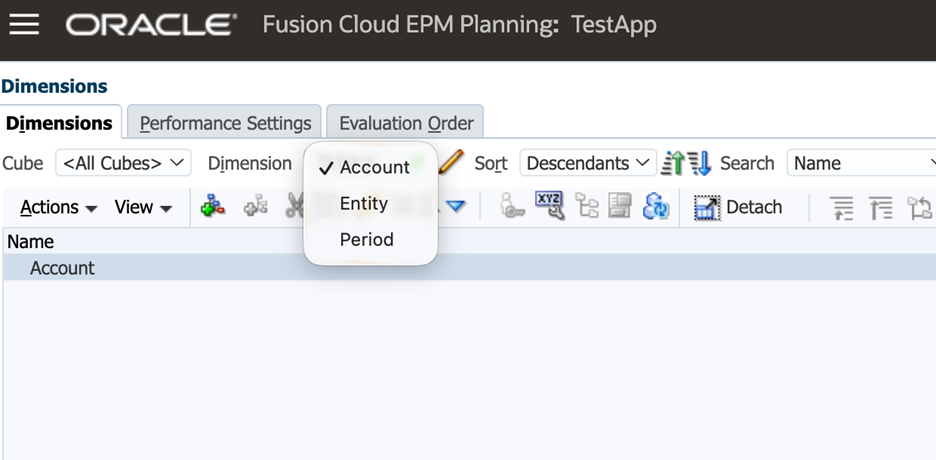
The created cube will be like this.
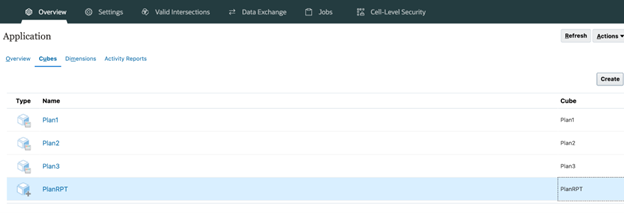
4.3 Adding a BSO Planning Cube + ASO Reporting Cube
After creating the initial cubes, you can always add more BSO or ASO cubes. The most common FreeForm architecture for operational reporting is a Hybrid BSO planning cube for data entry and calculation, combined with an ASO reporting cube for aggregation and distribution. Here is how to set it up:
4.4 Groovy and Business Rules in FreeForm
Groovy rules in FreeForm work identically to standard Planning. You access them through Calculation Manager, and the full Groovy API is available. One area that requires additional design care in FreeForm is calc script structure: because there is no built-in Account dimension intelligence, aggregation behavior (what consolidates, what does not, how variances are calculated) must be fully defined through your Essbase outline properties and calc scripts.
Practical implications:
- Design your Consolidation operators (+, -, ~, ^) explicitly for every member — do not leave defaults
- If your Measures dimension is a custom type (not native Account), time balance behavior (Balance, Flow, First) must be set per member manually
- FIX statements in Groovy-generated calc scripts should reference your actual custom dimension names — document these clearly for maintainability
| 💡 Pro Tip: Groovy in Multi-Cube FreeForm
In a multi-cube FreeForm app, a single Groovy rule can target a specific cube using operation.application.getCube(‘CubeName’). This is useful for orchestrating cross-cube workflows — for example, clearing the ASO cube, running a calculation in BSO, then triggering the Smart Push — all within one Groovy rule. |
5. Features Not Yet Available in FreeForm
FreeForm has matured significantly since its introduction, but a few Planning features remain unavailable as of the current release. Be aware of these before committing to FreeForm for a use case that depends on them.
| Feature | Available in Standard Planning? | Available in FreeForm? |
| Approvals (planning unit hierarchy) | Yes | No |
| Sandboxes | Yes | No |
| Task Manager | Yes | No |
| Groovy business rules | Yes | Yes |
| Calculation Manager | Yes | Yes |
| Data Integration | Yes | Yes |
| Smart View for Office | Yes | Yes |
| Smart Push / Data Maps | Yes | Yes |
| IPM / Advanced Predictions | Yes | Yes (as of recent releases) |
| Dashboards and Forms | Yes | Yes |
| Reports (Cloud EPM Reports) | Yes | Yes |
| Import from Essbase OTL | No | Yes (first cube only) |
Oracle continues to close the feature gap between FreeForm and standard Planning. Monitor the monthly What’s New documentation, Approvals and Task Manager have been on the roadmap and may be available by the time you read this.
6. FreeForm vs. Standard Planning: Decision Guide
Use this decision guide as a starting point when evaluating whether FreeForm is the right application type for a given use case.
| Scenario | Recommended Approach |
| Migrating a standalone Essbase cube to EPM Cloud | FreeForm — import OTL, preserve existing structure |
| Building a financial budgeting and forecasting application | Standard Planning (Custom or Financials module) |
| Workforce planning with headcount driver-based models | Standard Planning — Workforce module |
| Supply chain or operational planning with non-financial dimensions | FreeForm — define dimensions to match operational model |
| Multi-source data consolidation and reporting across 3+ systems | FreeForm — multi-cube architecture with shared ASO reporting |
| M&A scenario modeling or strategic long-range planning | FreeForm — flexible dimensionality for ad-hoc modeling |
| Need Approvals workflow in the near term | Standard Planning — Approvals not yet in FreeForm |
| Building a custom P&L planning model without prebuilt modules | Either — FreeForm gives more flexibility; Custom Planning is simpler to start |
Conclusion
FreeForm is one of the most strategically significant additions Oracle has made to the EPM Planning platform. It removes the dimensional constraints that have historically forced practitioners into awkward workarounds, the Account dimension repurposed as a product dimension, the Entity dimension carrying non-organizational hierarchies, the custom dimension count stretched to its limit.
Used correctly, FreeForm is the right choice for Essbase migrations, operational planning models, multi-source reporting repositories, and large-scale ad-hoc modeling. Used incorrectly, without Essbase cube design expertise, without deliberate dimension order planning, without a clear data integration strategy, it can produce applications that are harder to maintain and less performant than a well-designed standard Planning application.
The key is knowing when FreeForm’s flexibility serves the use case and when standard Planning’s built-in structure accelerates the build. This post is meant to give you a clear framework for making that decision, and the technical grounding to build FreeForm right when you do choose it.
As always, if you have questions or run into specific FreeForm design challenges, feel free to reach out through the contact page or post in the comments below.