








If you automate anything in Oracle Cloud EPM, you have a deadline. The December 2026 update (26.12) stops accepting the encrypted password files your scripts have been using for years, and it stops supporting EPM Automate clients older than 26.09. Your scheduled jobs will not warn you. They will simply start failing.
What changes, and what to do
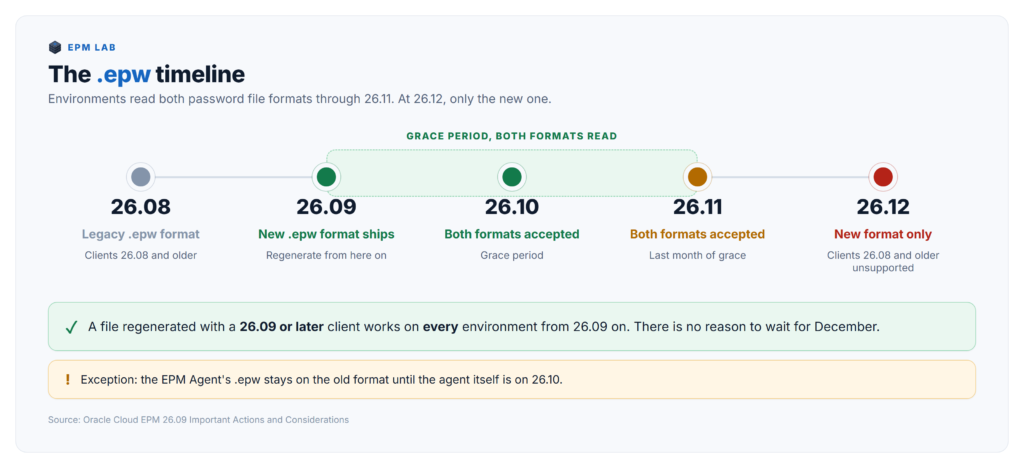
Starting with 26.09, EPM Automate writes encrypted password files (.epw) in a new, more secure format. Environments on 26.09, 26.10, and 26.11 read both the old format and the new one, so nothing breaks yet. That grace period ends at 26.12, when environments accept only the new format and stop supporting EPM Automate clients bundled with 26.08 or earlier. To stay working: once your environment is on 26.09, upgrade your EPM Automate client to 26.09 or later and run epmautomate encrypt again to regenerate every .epw file you have. The new file works against every environment on 26.09 or later, so there is no reason to wait for December. One exception: files used by the EPM Agent, covered below.
Why teams miss it
Most release notes list features you adopt when you are ready. This one breaks jobs on Oracle’s schedule, and three things make it easy to miss.
It fails silently and late. No job warns you in advance. The first symptom is a job that used to run fine failing at login, and it happens on Oracle’s schedule, not yours.
The files are old and scattered. Most teams created their .epw files once, during the original implementation, and never touched them again. They sit on jump boxes, build agents, shared drives, and someone’s laptop. The person who created them has often left.
The grace period hides it. Through 26.09, 26.10, and 26.11 everything keeps working, and that is when people decide the warning did not apply to them.
What actually changed
| Update | Behavior |
|---|---|
| 26.09 | EPM Automate begins writing .epw files in the new format. Environments read both formats |
| 26.10 | Both formats still read |
| 26.11 | Both formats still read. Last month of the grace period |
| 26.12 | New format only. Clients bundled with 26.08 or earlier are no longer supported |
The change is a security improvement to how the password file is encrypted. The encrypt command itself has not changed, and neither has anything else about how your scripts call EPM Automate. Your scripts stay as they are. Only the files and the client change.
A new .epw generated by a 26.09 client works against any environment on 26.09 or later. You do not have to coordinate the regeneration with the December update. What you do have to check is that every environment the file is used against has reached 26.09. Oracle recommends regenerating after the update, and a test environment on 26.09 next to a production environment still deferring updates is where a new file works in one place and fails in the other.
Am I affected?
If you run EPM Automate, yes. Check three things.
1. What client version is installed?
The simplest check is to log in and read what EPM Automate tells you. It identifies the installed version at login and reports when a newer one is available.
| epmautomate login <username> <password_file> <url> |
On Windows you can also confirm through Programs and Features, or by looking at the install folder, which defaults to C:\Program Files\Oracle\EPM Automate.
2. Where are your .epw files?
This is the step people underestimate. Search the whole machine, not only the folder your main script lives in. On a large drive the search takes a few minutes.
Windows, PowerShell:
| Get-ChildItem -Path C:\ -Filter *.epw -Recurse -Force -ErrorAction
SilentlyContinue | |
-Force matters. Without it the search skips hidden folders, and C:\ProgramData and AppData are both hidden. .epw files often live there. The command covers the C: drive only, so repeat it for every other drive your scripts use.
Linux or macOS:
| find / -name “*.epw” -type f 2>/dev/null -exec ls -l {} \; |
Check the default locations too. On Windows that is ProgramData\Oracle\EPM Automate. On Linux it is whatever directory the encrypt command was invoked from, which is frequently not where anyone expects.
3. What calls those files?
Grep your scheduler and your scripts for .epw and for epmautomate login. Windows Task Scheduler, cron, Jenkins, Control-M, Autosys, and any wrapper script all count.
The fix
Four steps. Budget about an hour.
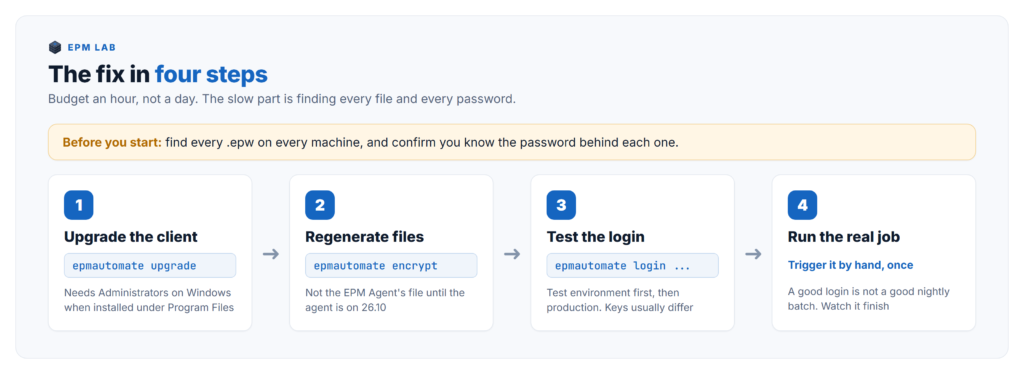
Step 1. Upgrade the client.
| epmautomate upgrade |
Two cautions on Windows. The command needs Administrators group membership when EPM Automate sits in C:\Program Files\Oracle\EPM Automate, because that folder is write protected. And if you installed somewhere else, upgrade will not move the installation, it upgrades in place.
While you are here, confirm Java. Since 25.08, EPM Automate requires Java 17 or newer. The Windows installer bundles its own Java, so this only affects Linux clients, where you need Java 17 on the machine and JAVA_HOME pointing at it.
Step 2. Regenerate each password file, except the EPM Agent’s.
Stop before you touch the EPM Agent. Oracle’s notice carries an exception that is easy to miss. If you use an .epw file with the EPM Agent, keep using the file generated by the 26.08 or earlier client until the EPM Agent itself is updated to 26.10. Regenerate every other file once its environments are on 26.09. For the agent, plan the sequence: update the agent to 26.10, then regenerate its file, all before the 26.12 update. A blanket “regenerate everything” script run before then breaks the agent’s integration the day it runs, months before the December deadline you were planning around.
The syntax has not changed:
| epmautomate encrypt PASSWORD|REFRESH_TOKEN KEY PASSWORD_FILE [ClientID=CLIENT_ID] [ProxyServerPassword=PROXY_PASSWORD] |
A plain password:
| epmautomate encrypt P@ssword1 myKey C:\mySecuredir\password.epw |
Behind an authenticating proxy:
| epmautomate encrypt P@ssword1 myKey C:\mySecuredir\password.epw ProxyServerPassword=Proxy_Pwd1 |
An OAuth 2.0 refresh token, where ClientID is required and must not be used for plain passwords:
| epmautomate encrypt AAyyilYBAWD4…FVkxefd8kjoJr6HJPA= myKey C:\mySecuredir\oauth.epw ClientID=6fdf2e72fd343430ABR22394C |
Rename the old file to .epw.bak first, then write the new one to the original path and name. That way nothing downstream has to change, you keep a fallback until testing is done, and no script can pick up the wrong file.
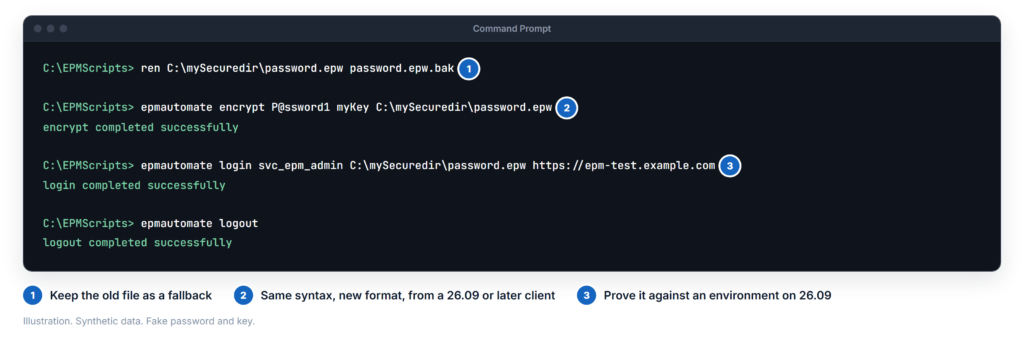
Step 3. Test against a real environment.
Log in with the new file and run something harmless.
| epmautomate login svc_epm_batch C:\mySecuredir\password.epw https://your-test-environment-host epmautomate listfiles epmautomate logout |
Use your test environment first. Then repeat against production, because the password and the key are usually different and a file that works in one does not prove the other.
Step 4. Run the real job once, manually.
A successful login is not the same as a successful nightly batch. Trigger the actual scheduled job by hand and watch it finish.
The parts people get wrong
Service accounts whose password nobody knows. You cannot regenerate an .epw without the password it encrypts. If your batch account was set up years ago by someone who has left, you need that password reset before you can do anything else. Find this out now, not in the second week of December. Expect this to be the slowest part of the whole job.
Jobs that only run at quarter end. A monthly job fails in December and somebody notices within a day. A job that runs only at quarter end runs on 2026-09-30, while the old file still works, and then not again until the end of December, after the cutover. That is the middle of year end close, which is the worst possible time to discover an authentication problem.
One file shared by many jobs. A single .epw on a shared drive read by six different scripts is convenient right up to the moment you regenerate it. Inventory what reads each file before you replace it.
Copies you forgot. Developers copy .epw files to their laptops to test things. Those copies break too, and they break in a way that looks like a code problem rather than a credential problem.
Multiple environments. Test, production, and any sandbox each have their own file. Doing one and assuming the rest are fine is how this comes back in January.
While you are in there
Four more things worth a few minutes, since you are already auditing your automation. The first one has an earlier deadline than the .epw change.
Drop the account name from user names by 26.11. Starting with the November update, the EPM Automate login command and the REST APIs stop accepting user names prefixed with the Cloud account name, in the form accountName.userName. Use the plain user name instead. Since you are editing login lines for the .epw change anyway, fix both at once.
setIPAllowList and getIPAllowList are gone. Oracle removed both commands and the matching IPAllowList REST API in 26.05. An older client skips the call without an error, so a script that still makes it looks healthy while the allowlist change it was meant to make never happens. The replacement is Network Perimeter in the Oracle Identity Cloud domain.
The ampersand is gone as a POV delimiter. In Enterprise Profitability and Cost Management REST APIs and EPM Automate commands, & is no longer supported as a POV delimiter, because it conflicts with other features. Supported delimiters are now underscore, hash, tilde, percent, semicolon, colon, and dash. If you run EPCM, grep your scripts for & in POV strings.
restoreEnvironment now exists. Also added in 26.05, it restores an EPM or EDM environment from the Environment Backup that the daily maintenance process creates. If you built your own restore tooling before this shipped, it is worth comparing. I wrote about the backup side of this in .
Do it this month
The work itself takes about an hour. The slow part is tracking down a service account password nobody remembers, so start on that this week.
Upgrade the client, regenerate the files, test the jobs, and put a note in your calendar to read the Important Actions and Considerations section of the release notes each month. Oracle publishes these warnings months ahead, so a monthly read keeps you ahead of them.