








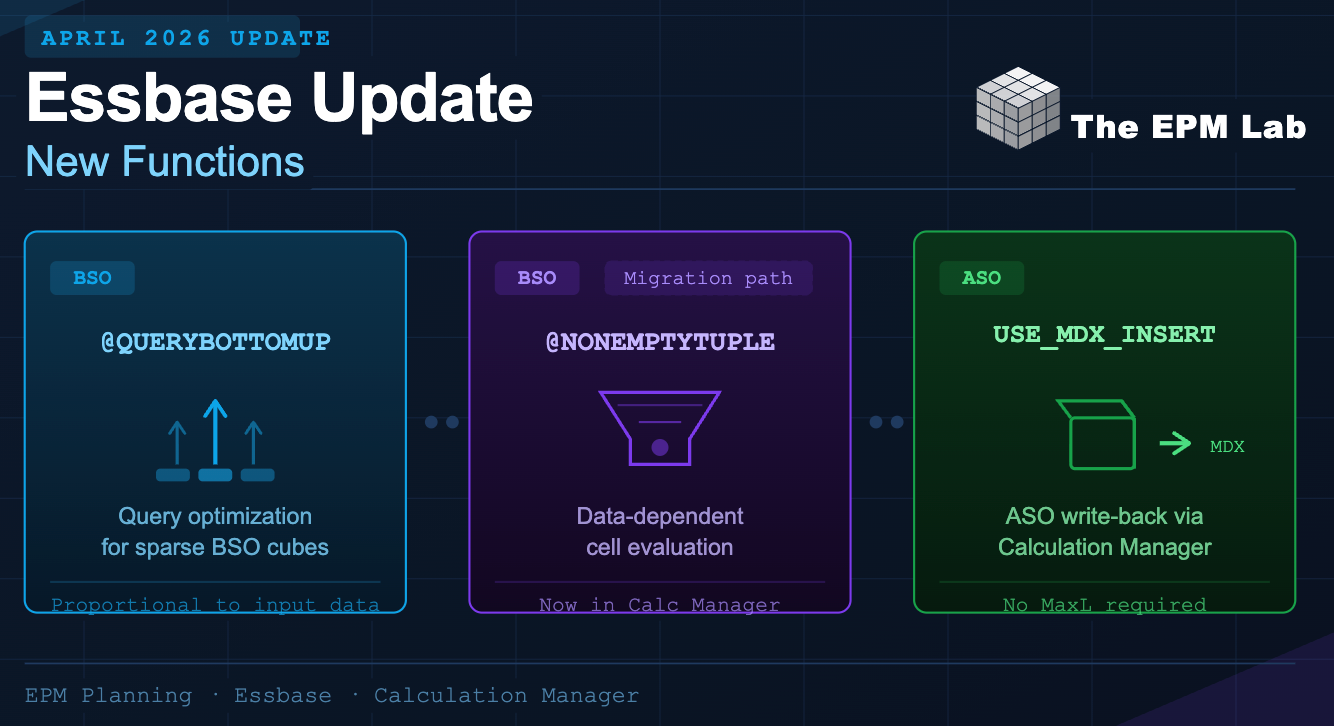
After a brief hiatus, Oracle EPM monthly updates return in April 2026. This patch brings a focused set of Essbase-level improvements and for planning developers who write Business Rules, this one is worth paying attention to.
The April 2026 update delivers two BSO calculation functions to the Calculation Manager, plus a new ASO MDX capability. Here’s everything you need to know.
1. What’s in the April 2026 EPM Update?
The highlights for Essbase in this update are:
| Function / Feature | Engine | Where | Status |
| @QUERYBOTTOMUP | BSO | Calculation Manager | Now Supported |
| @NONEMPTYTUPLE | BSO | Calculation Manager | Now Supported |
| USE_MDX_INSERT | ASO | Formula Component | Now Supported |
Let’s dig into each one — what it does, how to use it, and when you’d actually reach for it.
2. @QUERYBOTTOMUP — Smarter Calculation Targeting for BSO
What Does It Do?
@QUERYBOTTOMUP is an Essbase calculation function designed to optimize query execution in Block Storage (BSO) applications. Rather than scanning the entire data set, it intelligently identifies only the intersections required for the calculation, meaning query time scales proportionally to the size of your input data, not the size of the entire cube.
Why This Matters
In large BSO cubes with sparse dimensions, traditional calculations can be expensive because the engine evaluates more blocks than necessary. @QUERYBOTTOMUP short-circuits this by anchoring calculation traversal at the relevant input data intersections — reducing unnecessary block creation and improving performance.
Syntax
/* Basic @QUERYBOTTOMUP usage */
FIX(“Actual”, “FY2026”)
Allocated_Cost (@QUERYBOTTOMUP(Input_Cost));
ENDFIX
The function takes the source member (the input data) as its argument. Essbase uses that source to determine which blocks to create or calculate, working bottom-up from the sparse data that actually exists.
Use Cases
Use Case 1 — Allocation Calculations on Sparse Cubes
Imagine a cost allocation scenario where Input_Cost only exists for a subset of entity/department combinations. Without @QUERYBOTTOMUP, the calc script attempts to evaluate every combination in the FIX range. With it, only the blocks containing actual Input_Cost data are touched — avoiding unnecessary block creation across the entire sparse space.
Use Case 2 — Driver-Based Planning
In driver-based planning models, headcount or volume drivers only exist for active cost centers. Using @QUERYBOTTOMUP on the driver member means your overhead spread or workforce cost calculation only fires where drivers have been entered — no block creation across an empty entity hierarchy.
/* Spread overhead based on headcount driver */
FIX(“Budget”, “FY2026”, @RELATIVE(“AllEntities”, 0))
Overhead_Allocation (
@QUERYBOTTOMUP(Headcount_Driver)
);
ENDFIX
Pro Tip
@QUERYBOTTOMUP is most impactful in cubes where input data is sparse relative to the dimension space. If your data is dense, the benefit is less pronounced, but in typical planning applications with many empty intersections, this function can meaningfully reduce calculation time.
3. @NONEMPTYTUPLE — Now Supported in Calc Manager (But Read This First)
What Does It Do?
@NONEMPTYTUPLE is an Essbase formula directive that forces a formula to execute only against data-dependent cells. In other words, it restricts the formula’s evaluation to intersections where underlying data actually exists. This prevents the engine from calculating on empty or irrelevant intersections.
Syntax
/* @NONEMPTYTUPLE — forces data-dependent cell evaluation */
FIX(“Actual”, “Jan”)
Derived_Value (@NONEMPTYTUPLE Source_Value * 1.1);
ENDFIX
Deprecation Notice
Per Oracle’s documentation, for Release 21c and later, Oracle recommends using @QUERYBOTTOMUP instead of @NONEMPTYTUPLE. While @NONEMPTYTUPLE is now supported in Calculation Manager with this April 2026 update, if you are building new rules today you should default to @QUERYBOTTOMUP. The primary value of this addition is to support migration of existing calc scripts authored in native Essbase, those can now be moved into Calculation Manager without reworking function calls.
When to Use Which
| Scenario | Recommended | Reason |
| New rule development (Release 21c+) | @QUERYBOTTOMUP | Current Oracle recommendation |
| Migrating legacy calc scripts to Calc Manager | @NONEMPTYTUPLE | Avoids rewrite; now supported in Calc Manager |
| Optimization on sparse allocation cubes | @QUERYBOTTOMUP | Better performance on modern Essbase |
| Data-dependent formula, dense dimensions | Either | Test both; @QUERYBOTTOMUP preferred |
4. USE_MDX_INSERT — ASO Custom Calculations via MDX Insert
What Is MDX Insert?
This is the most architecturally significant addition in the April 2026 update. With USE_MDX_INSERT, you can now execute aggregate storage (ASO) custom calculations through MDX Insert by including the USE_MDX_INSERT directive as a comment in your Aggregate Storage Formula Component inside Calculation Manager.
MDX Insert is a write-back mechanism specific to ASO. It allows an MDX query to calculate a result set and write those values back into the ASO cube, bridging the gap between ASO’s read-oriented architecture and the need for calculated write-back values.
Background — Why This Matters for ASO
ASO cubes are highly efficient at aggregation but traditionally limited when it comes to custom write-back calculations. MDX Insert has existed in native Essbase, but the ability to trigger it directly from a Calculation Manager Formula Component makes it accessible in EPM Cloud workflows without requiring external scripts or MaxL.
How to Enable It
When creating an Aggregate Storage Formula Component in Calculation Manager, include USE_MDX_INSERT as a comment at the top of the formula body. The Essbase engine recognizes this directive and executes the formula using MDX Insert semantics.
/* USE_MDX_INSERT */
/* MDX Insert — write calculated values back to ASO */
INSERT INTO ASOCube
SELECT (
{[Jan], [Feb], [Mar]},
{DESCENDANTS([AllProducts], [Product].[Level0Members])},
{[Actual]}
)
ON COLUMNS,
(
{DESCENDANTS([AllEntities], [Entity].[Level0Members])}
)
ON ROWS
FROM [ASOCube]
WHERE ([Revenue_Allocated] = [Gross_Revenue] * [AllocationPct])
Use Cases
Use Case 1 — ASO Allocation Write-Back
One of the most common pain points with ASO cubes is performing allocations that write a result back into the cube. Previously, this required a workaround — either switching to a BSO currency or using an external data load. With USE_MDX_INSERT, you define the allocation logic entirely in MDX and write the result directly into your ASO cube from a Calculation Manager rule. No MaxL. No external data load.
Use Case 2 — Period-Over-Period Variance Write-Back
ASO reporting cubes often hold actuals aggregated from a BSO source. With MDX Insert, you can calculate a variance (e.g., Actual vs. Prior Year) within MDX and persist it back into the ASO cube as a stored member value — useful when downstream reporting tools need a stored, not dynamically-calculated, variance figure.
/* USE_MDX_INSERT */
INSERT INTO ReportingCube
SELECT (
{[FY2026]},
{MEMBERS([Period])}
)
ON COLUMNS,
(
{DESCENDANTS([AllEntities], 0)}
)
ON ROWS
FROM [ReportingCube]
WHERE (
[Variance_PY] = [Actual] – (Actual, [FY2025])
)
Use Case 3 — Targeted Recalculation on a Slice of Data
Because MDX Insert targets specific slices defined in your SELECT statement, you can scope a recalculation precisely. For example, recalculating stored values only for a new fiscal period without touching the rest of the cube. This is significantly more surgical than clearing and reloading an entire ASO cube.
Note on MDX Insert Specification
The MDX Insert specification has specific structural rules: the INSERT INTO target, SELECT axis definitions, FROM clause, and WHERE clause follow a defined grammar. Ensure your MDX is valid before deploying in a Calculation Manager rule, syntax errors will surface at runtime. Refer to the Oracle Essbase MDX Insert Specification documentation for the full grammar reference.
Summary
The April 2026 EPM update is a solid release for the Essbase layer. Here’s the quick recap:
| Feature | Engine | Takeaway |
| @QUERYBOTTOMUP | BSO | Use for new rule development. Optimizes calc by anchoring traversal to input data size. Best on sparse cubes. |
| @NONEMPTYTUPLE | BSO | Now available in Calc Manager. Use for migrating legacy scripts only — not for new development. Prefer @QUERYBOTTOMUP going forward. |
| USE_MDX_INSERT | ASO | Powerful new capability for write-back from Calculation Manager to ASO cubes. Opens allocation and persistence patterns previously requiring external tooling. |
All three features are enabled through standard Calculation Manager authoring, no additional configuration switches required. The BSO functions are available in the formula editor for Block Storage applications, and USE_MDX_INSERT is activated with a single comment directive.
That’s a wrap on the April 2026 EPM Essbase update. Follow TheEPMLab for deep dives, walkthroughs, and hands-on examples as these features mature. If you’re seeing interesting use cases in the wild, drop a comment below.